Tutorial 4: Boundary Conditions and Time-Dependent Functions
Context
In this tutorial, we use a small strain linear elastic based solid mechanics solver (see Solid Mechanics Solver) from GEOS to solve for the bending problem of a three-dimensional cantilever beam. The beam is fixed at one end, and subjects to a traction force pointing to the y-positive direction on the other end. The beam is deformed in the x-y plane.
Objectives
At the end of this tutorial, you will know:
how to use the solid mechanics solver to solve a quasistatic problem,
how to set up displacement boundary condition at element nodes,
how to set up traction boundary condition on element surfaces,
how to use a table function to control time-dependent loading.
Input file
This tutorial uses no external mesh file. As in the previous tutorials, the physics is defined in a base file, which is included by the file you run:
inputFiles/solidMechanics/beamBending_base.xml
inputFiles/solidMechanics/beamBending_benchmark.xml
A lighter version of the case, beamBending_smoke.xml, includes the same base file; the finite element discretization shown below is taken from it.
Discretized computational domain
The following mesh is used in this tutorial:

This mesh contains 80 x 8 x 4 eight-node brick elements in the x, y and z directions, respectively.
Here, the InternalMesh
is used to generate a structured three-dimensional mesh with C3D8 as
the elementTypes. This mesh is defined as a cell block with the name
cb1.
  <Mesh>
    <InternalMesh
      name="mesh1"
      elementTypes="{ C3D8 }"
      xCoords="{ 0, 80 }"
      yCoords="{ 0, 8 }"
      zCoords="{ 0, 4 }"
      nx="{ 160 }"
      ny="{ 16 }"
      nz="{ 8 }"
      cellBlockNames="{ cb1 }"/>
  </Mesh>
Gravity
The gravity is turned off explicitly at the beginning of the input file:
  <Solvers
    gravityVector="{ 0.0, 0.0, 0.0 }">
Solid mechanics solver
The solid mechanics solver is based on the small strain Lagrangian finite element formulation.
The problem is run as QuasiStatic without considering the beam inertial. The computational
domain is discretized by FE1,
which is defined in the NumericalMethods block. The solver is applied to the region Region2.
As in the flow tutorials, the solver does not name a material: it uses the solid model listed in the
materialList of Region2 (here shale), whose properties are defined in the
Constitutive block.
    <SolidMechanicsLagrangianFEM
      name="lagsolve"
      discretization="FE1"
      targetRegions="{ Region2 }"
      logLevel="1">
Finite element discretization
The computational domain is discretized by C3D8 elements with the first order interpolation
functions at each direction in the parent domain. The 2 x 2 x 2 Gauss quadrature rule is adopted to be
compatible with the first order interpolation functions.
  <NumericalMethods>
    <FiniteElements>
      <FiniteElementSpace
        name="FE1"
        order="1"/>
    </FiniteElements>
  </NumericalMethods>
Constitutive model
The material shale, listed in the materialList of Region2, is defined here as linear isotropic elastic.
    <ElasticIsotropic
      name="shale"
      defaultDensity="2700"
      defaultBulkModulus="5.5556e9"
      defaultShearModulus="4.16667e9"/>
Boundary conditions
As aforementioned, the beam is fixed on one end, and subjects to surface traction on
the other end. These boundary conditions are set up through the FieldSpecifications block:
The fixed end uses
FieldSpecificationelements on thetotalDisplacementfield, withobjectPath="nodeManager": the displacement is imposed at the mesh nodes. Component0,1, and2refer to the x, y, and z direction, respectively, andscalegives the imposed value (here zero).The loaded end uses a
Tractionelement, withobjectPath="faceManager": the traction is applied on mesh faces. Its magnitude is given byscale(1 MPa), its direction bydirection(here, the y-direction), and its time variation by the function namedtimeFunction(see below).
The sets xneg and xpos designate the nodes (and faces) on the left-most and right-most boundaries of the domain in the x-direction.
Similar sets yneg, ypos, zneg, and zpos exist for the other directions.
These six sets are created automatically by the InternalMesh generator; with an external mesh, boundary sets must be defined
in the mesh file or with a Geometry block.
  <FieldSpecifications>
    <FieldSpecification
      name="xnegconstraint"
      objectPath="nodeManager"
      fieldName="totalDisplacement"
      component="0"
      scale="0.0"
      setNames="{ xneg }"/>

    <FieldSpecification
      name="yconstraint"
      objectPath="nodeManager"
      fieldName="totalDisplacement"
      component="1"
      scale="0.0"
      setNames="{ xneg }"/>

    <FieldSpecification
      name="zconstraint"
      objectPath="nodeManager"
      fieldName="totalDisplacement"
      component="2"
      scale="0.0"
      setNames="{ zneg, zpos }"/>

    <Traction
      name="xposconstraint"
      objectPath="faceManager"
      scale="1.0e6"
      direction="{ 0, 1, 0 }"
      functionName="timeFunction"
      setNames="{ xpos }"/>
  </FieldSpecifications>
Table function
A table function is used to define the time-dependent loading at the beam tip. The coordinates and values form a time-magnitude
pair for the loading time history. In this case, the loading magnitude increases linearly as the time evolves.
  <Functions>
    <TableFunction
      name="timeFunction"
      inputVarNames="{ time }"
      coordinates="{ 0.0, 10.0 }"
      values="{ 0.0, 10.0 }"/>
  </Functions>
Execution
Finally, the execution of the simulation is set up in the Events block, where
target points to the solid mechanics solver defined in the Solvers block, and
the time increment forceDt is set as 1.0s.
    <PeriodicEvent
      name="solverApplications"
      forceDt="1.0"
      target="/Solvers/lagsolve"/>
Result
To run the case, from the root of the repository:
geos -i inputFiles/solidMechanics/beamBending_benchmark.xml
The input file writes the deformed mesh in Silo format, and a TimeHistory output (displacement_history.hdf5)
with the displacement along a line of nodes (the trace box), collected by a PackCollection task.
The analytical solution for the deflection of a cantilever beam, used by the GEOS test suite to check this case,
is implemented in inputFiles/solidMechanics/beamBending_curve.py.
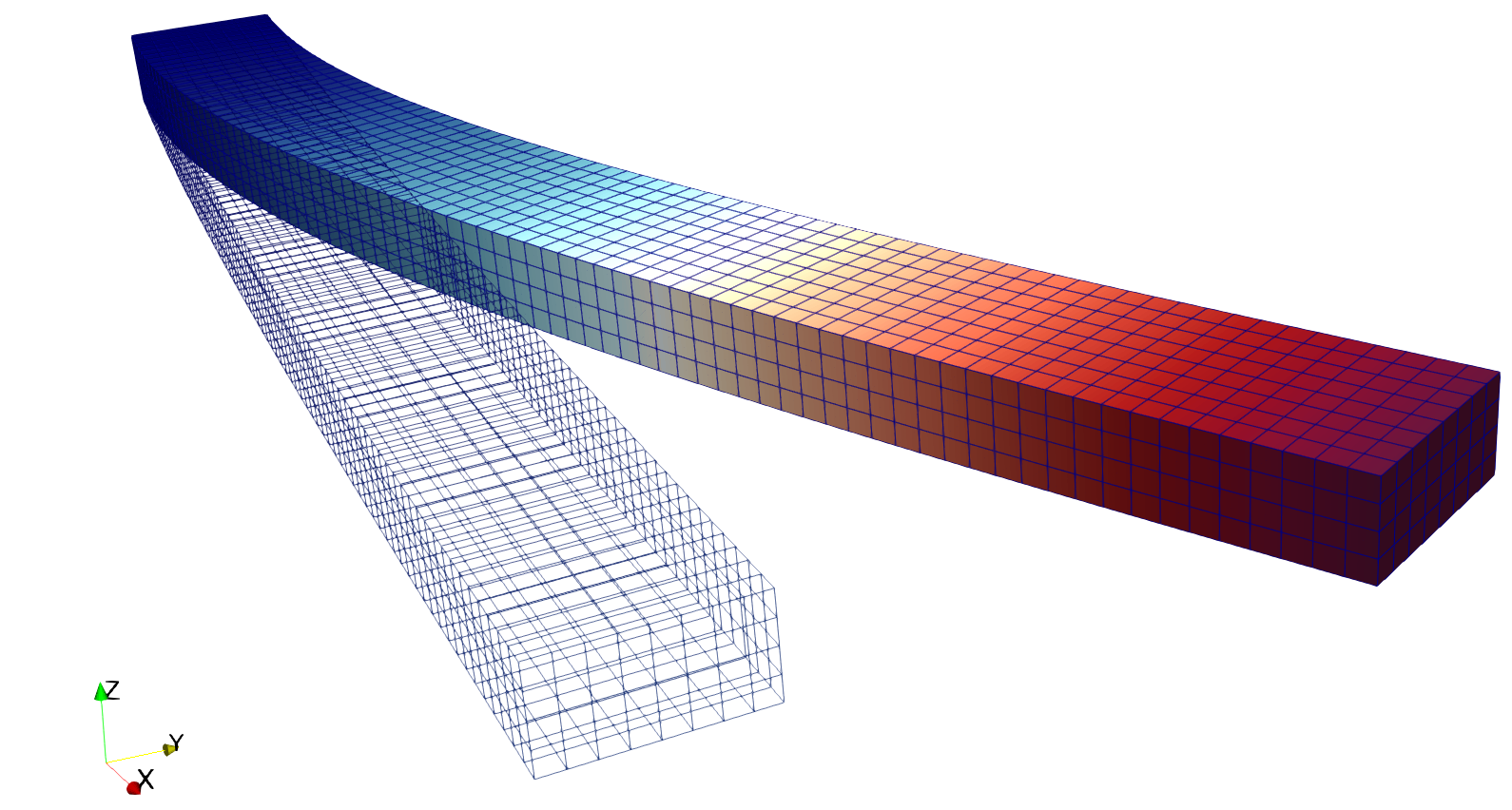
The deformed beam is shown as following (notice that the displacement is visually magnified):
To go further
Feedback on this tutorial
This concludes the solid mechanics for small-strain linear elasticity tutorial. For any feedback on this tutorial, please submit a GitHub issue on the project’s GitHub page.
For more details
More on meshes, please see Meshes.
More on events, please see Event Management.
More on running GEOS (in parallel, restarting), please see Running GEOS.
Next steps
You now know the basic building blocks of a GEOS input file. The Basic Examples show complete problems organized by physical process (multiphase flow, wells, CO2 injection, poromechanics, hydraulic fracturing).